
⚡ Terminal Session Proxy Manager
Manage proxy profiles for your terminal session from one command, in Rust: switch profiles, benchmark latency, diagnose connectivity, and control the environment variables your tools actually read — on macOS and Linux (Zsh / Bash).
✨ Features
Section titled “✨ Features”- Profiles, not exports. Name your proxies once, then switch with a single command or an interactive picker.
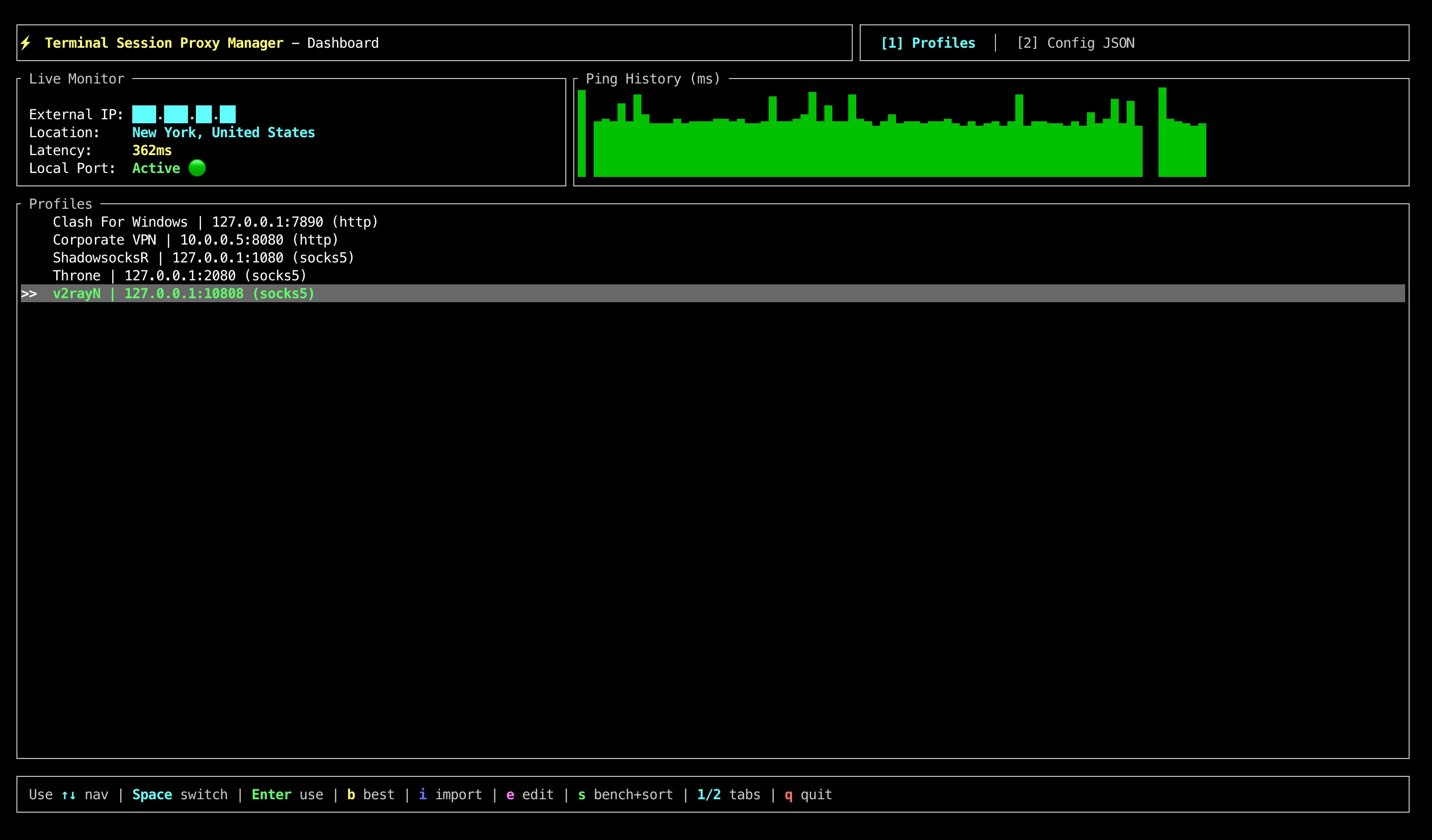
- Interactive TUI dashboard. Live IP, geolocation, latency sparkline, and profile switching in one screen.
- Pick the fastest automatically. Benchmarks every profile — each against all its ping targets at once — and selects the best one, with a health monitor that fails over to another profile when the active proxy dies.
- Diagnostics. Latency probes, socket checks, and a real bandwidth test.
- Exports everything. One command for Docker, cURL, Git,
.env, and JVM build tooling — with correct shell quoting. - Bilingual. Full English and Russian interface.
⚡ Quick Start
Section titled “⚡ Quick Start”📦 Installation
Section titled “📦 Installation”Homebrew (macOS / Linux):
brew install LebedevKondakovSergeyVach/tap/tspmCargo (requires Rust 1.88+):
cargo install tspmThis installs the tspm command into ~/.cargo/bin.
From source:
git clone https://github.com/LebedevKondakovSergeyVach/Terminal-Session-Proxy-Manager.gitcd Terminal-Session-Proxy-Managercargo install --path .🐚 Shell Integration
Section titled “🐚 Shell Integration”The binary cannot change the environment of the shell that launched it — no
process can. The proxy shell function bridges that gap, so add the init script
to your shell configuration:
Zsh (~/.zshrc):
eval "$(tspm init zsh)"Bash (~/.bashrc):
eval "$(tspm init bash)"Restart your terminal or run source ~/.zshrc. You now have proxy on,
proxy off, proxy switch, and tab completion.
First run
Section titled “First run”proxy profile set home --name "Home" --host 127.0.0.1 --port 1080proxy onproxy statusWhere proxy settings apply
Section titled “Where proxy settings apply”The active profile in config.json supplies two ways to apply proxy settings:
flowchart TD
    accTitle: Where proxy settings apply
    accDescr: Both commands read the active profile in config.json. proxy on changes the current shell and its future child commands. proxy run sets variables for one child command and its children, leaving the current shell unchanged.
    Profile["Active profile in config.json"]
    Profile --> On["proxy on"]
    Profile --> Run["proxy run -- …"]
    On --> Shell["Current shell environment"]
    Shell --> Commands["New commands inherit variables"]
    Run --> Child["Child command and its children"]
proxy on applies variables in your current shell; commands started there
inherit them. proxy run -- <cmd> applies them to that child command and its
children, leaving the shell unchanged. Tools must support these proxy settings.
Other terminals and already running processes keep their environment. See the
shell integration guide for the export and
dashboard sequences.
🚀 Commands
Section titled “🚀 Commands”Anything that changes your current shell goes through the proxy function;
everything else works with the full binary name too.
Session
Section titled “Session”| Command | Description |
|---|---|
proxy on | Enable the proxy for this shell session |
proxy off | Disable it |
proxy status | Proxy state, IPv4, IPv6, and physical location |
proxy status --json | The same, as JSON |
proxy run -- <cmd> | Run one command through the proxy, leaving the shell untouched |
proxy prompt | Prompt indicator, for embedding in PS1 / PROMPT |
Profiles
Section titled “Profiles”| Command | Description |
|---|---|
proxy profile list | List every profile |
proxy switch | Interactive arrow-key picker |
proxy use <key> | Switch to a profile by key |
proxy profile set <key> [--name N] [--host H] [--port P] [--protocol P] | Add or update a profile |
proxy profile remove <key> | Delete a profile |
proxy import <source> | Import profiles from a JSON file or a subscription URL |
Measurement
Section titled “Measurement”| Command | Description |
|---|---|
proxy dash | Interactive TUI dashboard |
proxy benchmark | Latency and availability of every profile |
proxy best | Benchmark, then switch to the fastest |
proxy ping [--timeout MS] | Latency to the endpoints in config.json |
proxy speedtest | Real download throughput |
proxy monitor | Health check with automatic failover |
proxy diagnose | Socket and endpoint diagnostics |
Integration
Section titled “Integration”| Command | Description |
|---|---|
proxy git <on|off|status> | Global Git proxy configuration |
proxy export <docker|curl|envfile> | Export settings for other tools |
proxy env <on|off> | Print raw shell statements (what proxy on evaluates) |
... init <zsh|bash> | Print the shell integration script |
... completions <zsh|bash|fish|powershell> | Print a completion script |
Configuration
Section titled “Configuration”| Command | Description |
|---|---|
proxy config path | Path to the active config.json |
proxy config show | Print the current configuration |
proxy settings path | Path to settings.json |
proxy settings show | Print global settings |
proxy lang <ru|en> | Switch interface language |
proxy debug <on|off> | Shell-integration debug logging |
Global options
Section titled “Global options”Available on every subcommand.
| Option | Environment variable | Purpose |
|---|---|---|
--config-file <PATH> | TSPM_CONFIG | Use a specific config.json |
--settings-file <PATH> | TSPM_SETTINGS | Use a specific settings.json |
--lang <ru|en> | TSPM_LANG | Language for this run only |
NO_COLOR is honoured. Useful for keeping several setups apart:
TSPM_CONFIG=~/work-proxies.json proxy best⚙️ Configuration
Section titled “⚙️ Configuration”Two files, both JSON:
config.json— profiles and the endpoints used for testing.settings.json— interface language and an optional custom config path.
Both live in your OS configuration directory
(~/Library/Application Support/tspm on macOS,
~/.config/tspm on Linux). Run proxy config path to
see exactly which file is in use.
Resolution order for config.json: --config-file → TSPM_CONFIG →
config_path in settings.json → the OS config directory.
A config file that exists but contains invalid JSON is reported and left alone — it is never overwritten with defaults.
See docs/CONFIGURATION.md for the full schema, and
configs/config.default.json for a complete
example.
📚 Documentation
Section titled “📚 Documentation”- 🌐 Documentation site — everything below, searchable and cross-linked
- 📦 Installation — build instructions and PATH setup
- 🐚 Shell Integration — Zsh, Bash, and prompt setup
- ⚙️ Configuration — full
config.jsonandsettings.jsonschema - 📖 Command Reference — every subcommand and flag
- 🤝 Contributing · 🔒 Security · 📝 Changelog